Configuring proposal application rules
With automatic proposal application, you decide which payment proposals Continia Banking applies on its own and which ones stay open for you to review. You configure this per matching type, so a match you trust, such as one found by a payment reference rule, can be applied automatically, while less certain matches are left for manual review.
You can also allow automatic application when a payment does not cover the full amount of the invoice. If you receive many partial payments, or payments that are matched by external document number but remain unapplied because the total amount does not match, rules that allow partial payment reduce the number of proposals you handle manually.
To enable automatic application
- Search () for and select Banking Import Setup.
- On the Matching FastTab, select Show More.
- Enable Automatic Proposal Application Setup.
To add a rule
- On the Banking Import Setup page, on the action bar, click Manual Setup and then click Automatic Proposal Application Setup. Alternatively, search () for and select Automatic Proposal Application Setup. The page lists the default rules included in Continia Banking and any custom rules you have added.
- Select a line, and on the action bar click Copy Setup Line. When you copy a default line, the copied line becomes the default, and the original default line is disabled.
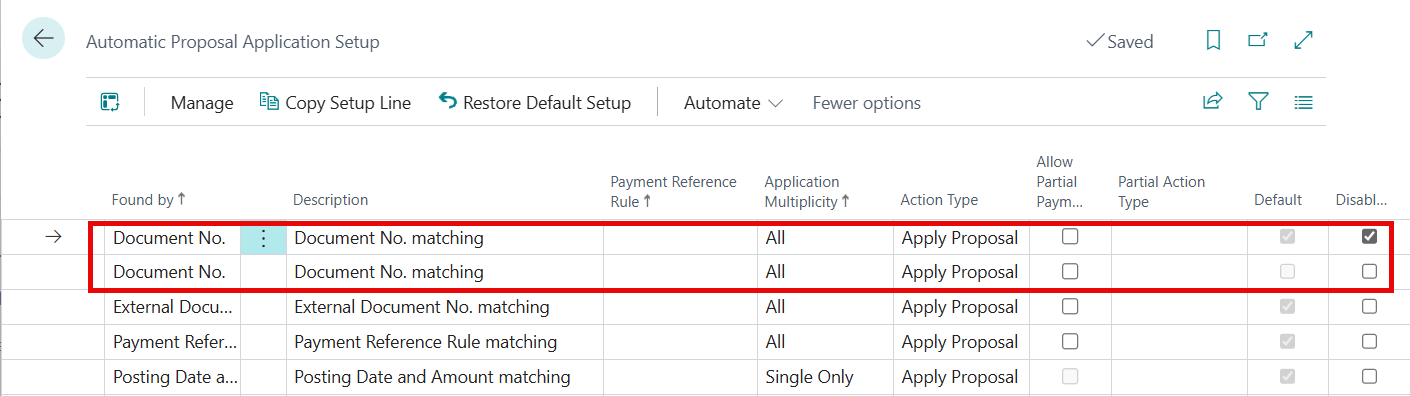
- Fill in the fields as needed.
| Field | Description |
|---|---|
| Found by | Specifies the matching strategy this rule applies to, such as Payment Reference Rule, Payment Information ID, or Document No. (Extended). |
| Description | Specifies a name or description for the rule. |
| Payment Reference Rule | Indicates the payment reference rule that must match for this setup to apply. If left blank, the setup applies regardless of the payment reference. |
| Application Multiplicity | Specifies whether the rule matches when the bank reconciliation line has a single proposal, multiple proposals, or both. Options are All, Single Only, and Multiple Only. |
| Action Type | Specifies the action to perform when the rule matches. Apply Proposal automatically applies the proposal. Review Proposal leaves the proposal open for manual review. |
| Allow Partial Payment | Specifies whether automatic application is allowed when the proposal total does not exactly match the statement amount. Any difference must be within the configured tolerance. |
To restore the default rules
On the Automatic Proposal Application Setup page, on the action bar, click Restore Default Setup.
Warning
This deletes all existing rules and recreates the default set. Any custom rules are removed.