Reg. Payment Proposals
The list of registered payment proposals shows the payment proposals that are already posted (= registered).
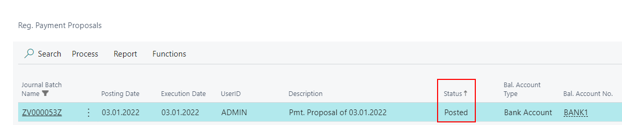
In the list of registered payment proposals it is possible to display an fact box area. Here you can see an overview of the payment amounts in the client currency and possible warnings that were shown during the processing of a payment proposal.
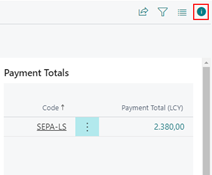
Via the amount fields of the registered payment proposal, you can, by clicking on the respective amount, branch to the overview of the related payment proposal cards. Details about the payment overview can be found in the related The Payment Proposal List chapter.
Menu items Process, Report and Functions
Process:
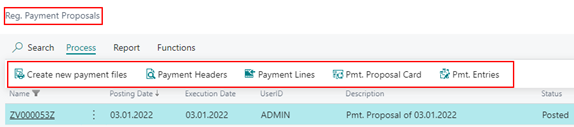
Create new payment files - allows you to recreate the associated payment files of a payment proposal at any time. When subsequently creating a payment file from the Registered Payment Proposals, the execution date is automatically adjusted to the current date if the original execution date is earlier than the current date.
Payment Headers - branch to the overview of the payment headers of the registered payment proposal. Editing is no longer possible.
Payment Lines - go to the list of payment lines of the registered payment proposal. Editing is no longer possible.
Pmt. Proposal Card - open the Reg. Payment Proposal Cards of a registered payment proposal. Editing is no longer possible.
Pmt. Entries - displays the payment entries that resulted from posting a payment proposal. Navigate can be used to go to the related G/L, Customer, Vendor, detailed Ledger Entries, and to the original payment proposal header.
Report

Reprint Advise - allows you to reprint the created payment advices of the registered payment proposal at any time.
Resend Advise - resend the payment advice of a registered payment proposal by email.
Print Payment List - create and print the payment list for the registered payment proposal.
Print Payment Report - create and print the payment log for the registered payment proposal.
Reprint AZV Payment Letter - create and print the required file payment letter of a payment proposal in the foreign payment transaction format.
Reprint Payment Letter - create and print the necessary payment letter of a payment proposal.
Reprint Checks - reprint the checks associated with a payment proposal at any time.
Functions

Delete Registered Payment Proposals - start a report with which already booked and processed payment proposals can be deleted. The data is irrevocably deleted via this function. A detailed description of the functionality can be found in the following item "Delete Registered Payment Proposals".
To delete Registered Payment Proposals
It is possible to delete registered payment proposals (incl. all dependent tables) via a batch run. This is useful, for example, if there are very many and very old payment proposals in the system that are no longer needed.
The deletion of the tables dependent on the payment proposal has been outsourced to a function, so that it is ensured that when deleting manually and when deleting via a batch run, always the same dependent tables are deleted and no orphaned records remain.
The call to delete is located in the list of registered payment proposals:
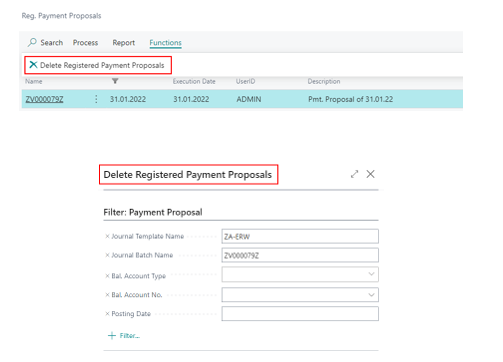
The associated report is pre-populated with the currently selected record and can be adjusted accordingly via filters.
It is important that the tables are not cached anywhere and cannot be reconstructed after deletion. This is the purpose of this functionality. Deleting is useful, for example, if there is a lot of particularly old data in the system that can no longer be used. In addition to freeing up storage space, the performance of the system can also be increased in this way.