Bank Account Search in Payment Proposal
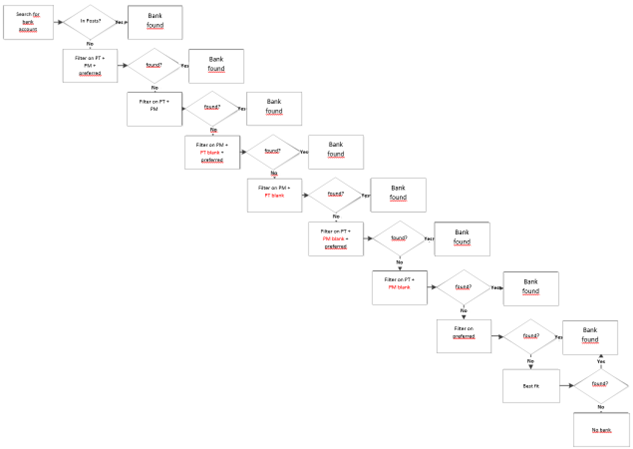
Within the described payment proposal creation a bank account search for the person accounts in the payment proposal is done by the system. Starting with version OPplus 15.00 this search is structured according to the following steps:
Accordingly, you can map fine or coarse setup structures in the created bank accounts. If a customer or a vendor has only one bank account, only the essential setups are necessary. However, if there are several bank accounts for different purposes in the subledger account, a correspondingly more differentiated setup must be made.
Here is an example application including the necessary equipment:
A customer has defined different bank accounts for various direct debits.
The invoices for services, for example, are to be debited via Bank Account 1, and the invoices for maintenance are to be collected via Bank Account 2.
You can now define different payment methods, which you then assign to the individual entries (service or maintenance). The payment method should then be set up with the "Separate payment proposal header" option. Thus, a separation takes place according to the payment method. In the bank account, you now select the corresponding payment method (e.g. "DL" or "WA"), and the assignment in the payment proposal takes place automatically, according to the described bank account search.
Warning in the Payment Proposal
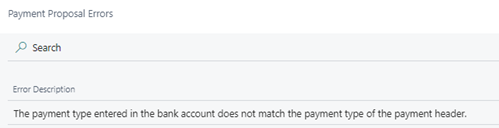
Additionally, a warning is integrated. For example, if you set up a bank account as a preferred bank account and define the payment type SEPA B2B within this bank account, you will receive a warning in the payment proposal if it does not contain the payment type SEPA B2B but, for example, SEPA in the payment proposal header.
Program flow chart for bank account determination
As of OPplus version 15.00, this is the program flow chart for bank account determination.