Setting up payment allocation for partial payments
The partial payment allocation type splits a payment into separate entries with different amounts and due dates. This is useful when an invoice must be paid in stages, for example when a portion is due on delivery and the remainder at a later date.
To set up the partial payment fields
To set up the partial payments for vendor or customer:
- Search () for and select Vendors or Customers. The following steps use a vendor as an example.
- Open the vendor card of the vendor that you want to set up the payment allocation for.
- On the action bar, click Related > Vendor > Payment Allocations
- On the Payment Allocations page, fill in the fields. For a description of all fields, see Setting up and managing payment allocations. Pay particular attention to the following:
- Type - select the Partial payment allocation type.
- Percentage/Amount - enter the amount or percentage for each allocation entry.
- Due Date Calculation - enter the due date for each allocation entry. The due date of the latest allocation entry must be earlier than the initial invoice due date on the purchase invoice. If it is not, the entries are marked red in the Payment Allocation Preview FactBox, and the following error appears when you try to post: The due date of payment allocation <date> cannot be later than the current due date of the related entry <date>.
When you run a suggest vendor payments in the payment journal, the system generates one allocation entry per partial amount. On the Payment Allocation Entries page, you can review the due dates for each entry.
For example, if you add the payment allocation type Partial for a vendor and set the allocation amounts to 101 for 1M and 202 for 2M, posting the entry displays the partial type and two amounts with due dates that are one month apart.

When you run a payment suggestion for the first due date, one line appears with the amount of the first allocation entry.
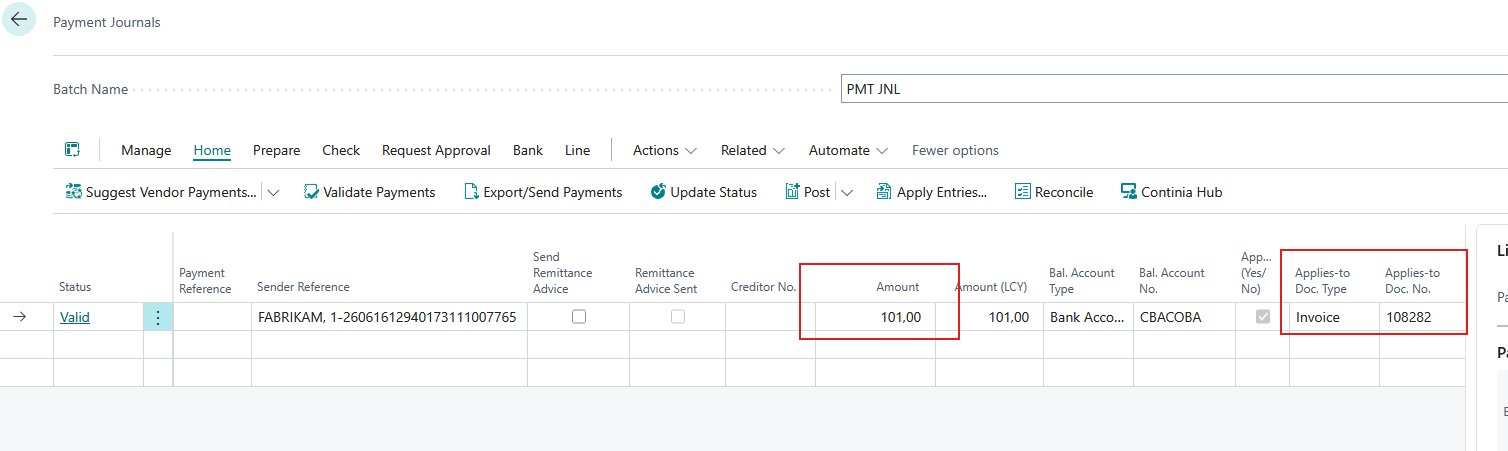
After you export and post the line, the open amount on the original line is reduced to reflect the completed partial payment.
On-hold payment allocation entries
Payment allocation entries support the On Hold status. The status is automatically synchronized with the related customer or vendor ledger entry, so when a ledger entry is placed on hold or removed from hold, its related open allocation entries are updated accordingly.
Payment suggestions respect the On Hold status of payment allocation entries, just as they do for customer and vendor ledger entries. By default, on-hold entries are excluded. To include them in a payment suggestion, select Include On Hold Entries. See Suggesting and processing payments.
To undo a payment allocation
For instructions on undoing a payment allocation, see Setting up and managing payment allocations.
Related information
Introducing payment allocation
Setting up and managing payment allocations
Setting up payment allocation for a G account in Continia Banking