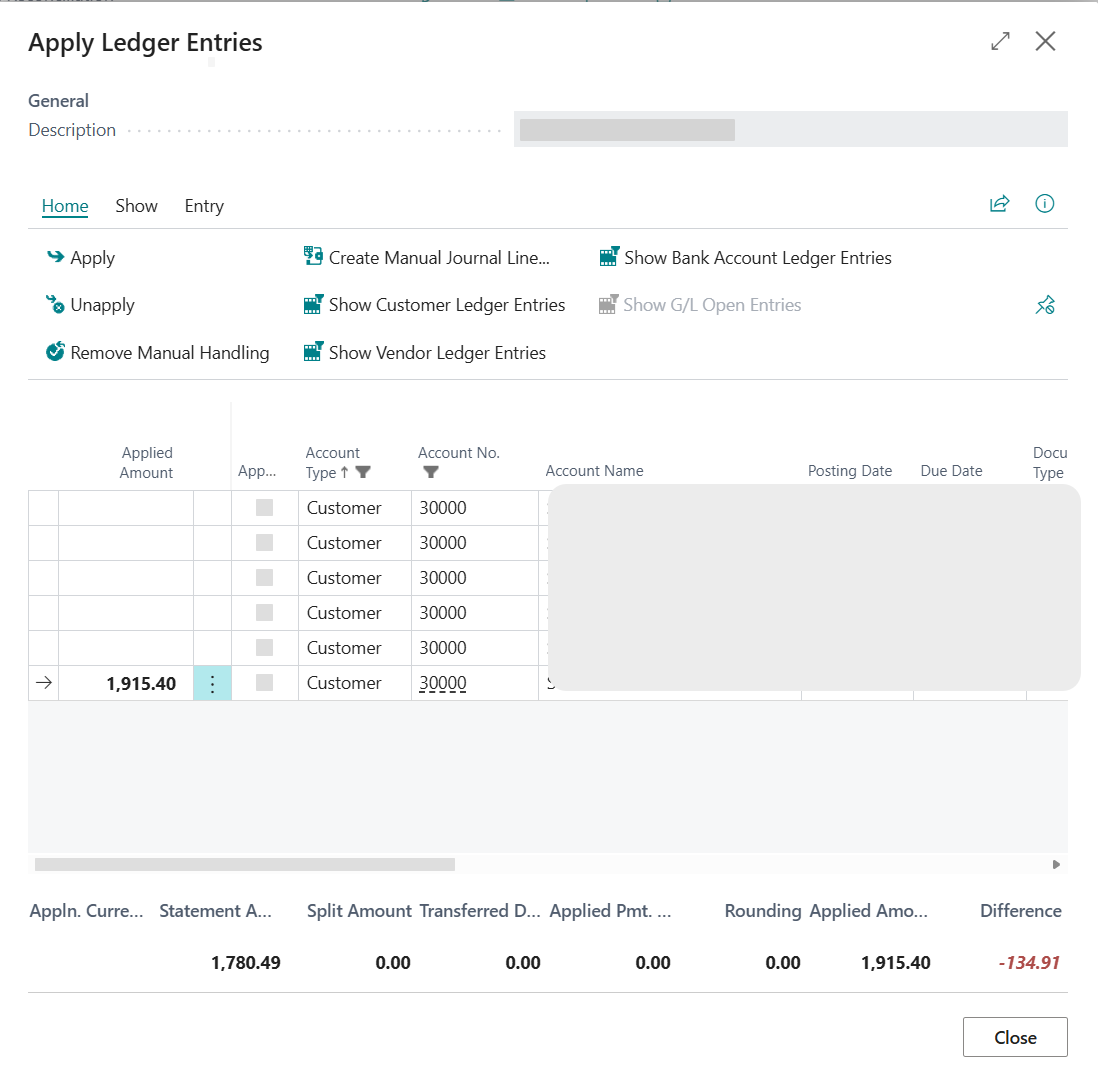
The Apply Ledger Entries page
Use the Apply Ledger Entries page to manually apply bank statement lines to open ledger entries during reconciliation. This article describes the page layout, all available fields, and the totals and actions used when completing manual applications.
Page layout overview
The Apply Ledger Entries page is divided into three main sections:
- Transaction details (top) — Bank statement line information.
- Ledger entries grid (middle) — All available open ledger entries that can be applied.
- Totals section (bottom) — Summary of calculated amounts used to complete the application.
Tip
Your column visibility preference (Show More or Show Fewer Columns) is saved automatically per user and persists across sessions.
Transaction details section
At the top of the page, you see information about the bank statement line you're applying:
| Field | Description |
|---|---|
| Description | Description from the bank statement line (Bank Account Reconciliation). |
| Transaction Text | Transaction text from the payment journal (Payment Reconciliation Journal). |
Ledger entries grid
The grid displays all open ledger entries available for application:
| Field | Description | Editable |
|---|---|---|
| Applied Amount | Amount applied to the entry. | Yes |
| Applied | Select to include the entry in the application. | Yes |
| Account Type | Customer, vendor, employee, bank account, or G/L account. | No |
| Account No. | Account number. | No |
| Account Name | Name of the account. | No |
| Posting Date | Posting date of the entry. | No |
| Due Date | Due date of the entry. | No |
| Document Type | Invoice, credit memo, payment, etc. | No |
| Document No. | Document number of the original transaction. | No |
| External Document No. | Vendor or customer invoice/bill number. | No |
| Description | Description of the ledger entry. | No |
| Currency Code | Currency of the ledger entry. | No |
| Amount | Original amount of the ledger entry. | No |
| Remaining Amount | Open amount available for application. | No |
| Remaining Amt. Incl. Discount | Remaining amount including discount. | No |
| Pmt. Discount Date | Last date to receive the full payment discount. | No |
| Pmt. Disc. Tolerance Date | Extended discount date if tolerance applies. | No |
| Accepted Pmt. Disc. Tolerance | Indicates whether discount tolerance is accepted. | Yes |
| Remaining Pmt. Disc. Possible | Remaining discount available if paid on time. | No |
| Applied Pmt. Discount | Discount applied during this application. | No |
| Max. Payment Tolerance | Maximum tolerance amount allowed. | No |
| Applied Pmt. Tolerance | Tolerance applied during the application. | Yes |
| Remaining Amount after Application | Remaining amount after the application is posted. | No |
Additional fields
When you choose Show More Columns, additional fields display showing currency conversion amounts:
| Field | Description |
|---|---|
| Appln. Applied Amount | Applied amount in the application currency. |
| Appln. Remaining Amount | Remaining amount in the application currency. |
| Appln. Remaining Amt. Incl. Disc. | Remaining discounted amount in the application currency. |
| Appln. Remaining Pmt. Disc. Possible | Available discount in the application currency. |
| Appln. Applied Pmt. Discount | Applied discount in the application currency. |
| Appln. Max. Payment Tolerance | Maximum tolerance in the application currency. |
| Appln. Applied Pmt. Tolerance | Applied tolerance in the application currency. |
Multi‑currency fields prefixed with Appln. display the converted values in the bank account currency.
Totals section
The totals section at the bottom of the page provides an overview of the calculated amounts used when completing the application.
| Name | Description |
|---|---|
| Appln. Currency | Currency used during the application. |
| Statement Amount | Amount from the bank statement line. |
| Transaction Amount | Amount from the payment journal line. |
| Split Amount | Amount allocated using a split rule. |
| Transferred Difference Amount | Difference already transferred to a journal. |
| Applied Pmt. Discount | Total payment discount applied. |
| Applied Pmt. Tolerance | Total payment tolerance applied. |
| Rounding | Rounding difference for currency conversions. |
| Applied Amount | Total applied amount across all selected entries. |
| Difference | Remaining amount after application. Should be zero for full reconciliation. |
Note
The Difference field displays in green when fully applied (zero difference) and red when incomplete.
Page actions
| Name | Description |
|---|---|
| Apply | Applies the selected ledger entries. |
| Unapply | Reverses an existing application. |
| Transfer Difference to Journal | Transfers the difference to a general journal (Bank Account Reconciliation). |
| Transfer Diff. to Account | Transfers the difference to a selected account (Payment Reconciliation Journal). |
| Set Manual Handling | Marks the reconciliation line for manual handling outside the system. |
| Remove Manual Handling | Removes the manual handling status. |
| Create Manual Journal Line | Creates a manual journal line for reconciliation. |
| Show More Columns | Displays additional fields. |
| Show Fewer Columns | Hides additional fields. |
| Show All | Shows all available ledger entry types. |
| Show [Account Type] Ledger Entries | Filters ledger entries by account type. |
| Show Ledger Entry | Opens the related ledger entry. |
| Show Document | Opens the posted document. |
Related information
Applying ledger entries manually
Manual application examples
Manual application FAQ
Introducing manual application