Document number matching
Continia Banking identifies document numbers in imported bank statements to ensure accurate and automated payment reconciliation. Understanding how document numbers are matched helps you configure consistent and reliable posting results.
Number series as the basis for matching
Continia Banking uses the configured number series to understand how document numbers are structured. The following setups define the valid number series:
- Sales & Receivables Setup: posted invoice numbers and posted credit memo numbers.
- Purchases & Payables Setup: posted invoice numbers and posted credit memo numbers
From these number series, the system determines:
- the expected length of the numeric part.
- whether prefixes or suffixes are part of the document number.
These definitions are used to validate numbers extracted from bank transaction text. Matching can still succeed even when prefixes or suffixes are missing in the transaction text, provided that:
- the extracted numeric value exists as a posted document.
- the numeric length matches the number series definition.
- no conflicting document candidates are found.
Vigtigt
Only number series that are active at the time of matching are considered during automatic document number matching.
If a document number exists in the ledger but does not come from an active number series, it will not be matched automatically. To ensure proper reconciliation in these cases, configure a payment reference rule.
Matching methods
Document number recognition uses two matching approaches, applied in order from strictest to most flexible:
- Standard document number matching (enabled by default)
- Extended document number matching (optional, must be enabled in setup)
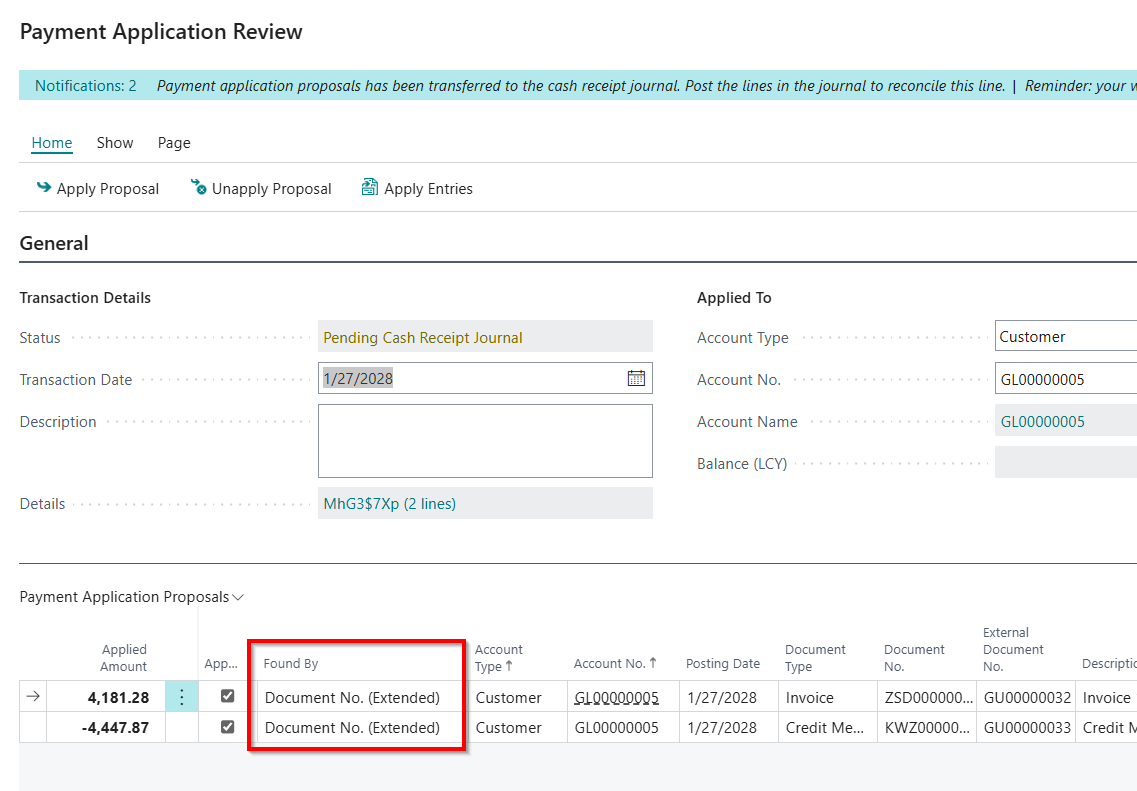
For standard matching, the resulting matching type is shown as Document No. on the Payment Application Review page. For extended matching, the matching type is shown as Document No. (Extended).
Standard document number matching
Standard document number matching works out of the box and includes two internal validation steps: direct matching and digit-only matching. Both steps rely on active number series and posted open ledger entries.
Standard matching:
- Validates document numbers against active number series definitions.
- Supports both prefixes and suffixes.
- Separates content using characters such as spaces, dots, slashes, and dashes.
Direct document number matching
Direct matching is the strictest validation step. It compares the document number found in the bank transaction text directly with posted document numbers, including any prefix or suffix, except for minor separators.
This step succeeds when the transaction text represents the full document number in a recognizable format.
Digit-only matching
If direct matching fails, Continia Banking attempts digit-only matching. This step does not extract digits from arbitrary text. Instead, it:
- Splits the identified document number by minor separators.
- Checks whether the resulting value contains only digits.
- Combines the digits with the active number series prefix or suffix.
- Verifies whether the reconstructed document number exists as an open ledger entry.
For example, if the active number series prefix is INVOICE and the bank transaction text contains 000001, the system reconstructs INVOICE000001 and checks whether it exists as an open entry.
Digit-only matching allows successful reconciliation when prefixes or suffixes are omitted in the bank statement data but the numeric part is intact.
Extended document number matching
Extended document number matching is designed for bank statements that contain document numbers in inconsistent or irregular formats. This matching method is disabled by default.
To enable extended document number matching:
- Search (
 ) for and select Banking Import Setup.
 - In the Document No. section enable Extended Document No. Prefix Matching.
When switched on extended matching:
- Scans transaction text and references.
- Splits text using minor separators.
- Extracts numeric sequences from mixed alphanumeric values.
- Combines the extracted digits with the active number series prefix or suffix.
- Validates the reconstructed document number against open ledger entries.
Example If the active number series prefix is INVOICE and the bank transaction text contains PAY000001, the system extracts 000001, reconstructs INVOICE000001, and checks whether it exists as an open ledger entry.
Extended matching works with both prefixes and suffixes and supports document numbers embedded within longer or irregular text strings. When a match is found using this method, the Payment Application Review page displays: Found by = Document No. (Extended)