Continia eDocuments for Document Output
Continia eDocuments is your organization's hub for the exchange and management of electronic business documents. Using the Continia Delivery Network, Continia eDocuments is shared between Continia Document Output and Continia Document Capture as a unified framework, and you get the most value from it if you have both solutions installed and activated. It makes it easy for you to exchange and handle your business documents throughout the procure-to-pay process from a single place, whether it's sending or receiving purchase orders, order confirmations, sales orders, sales invoices, or other types of documents.
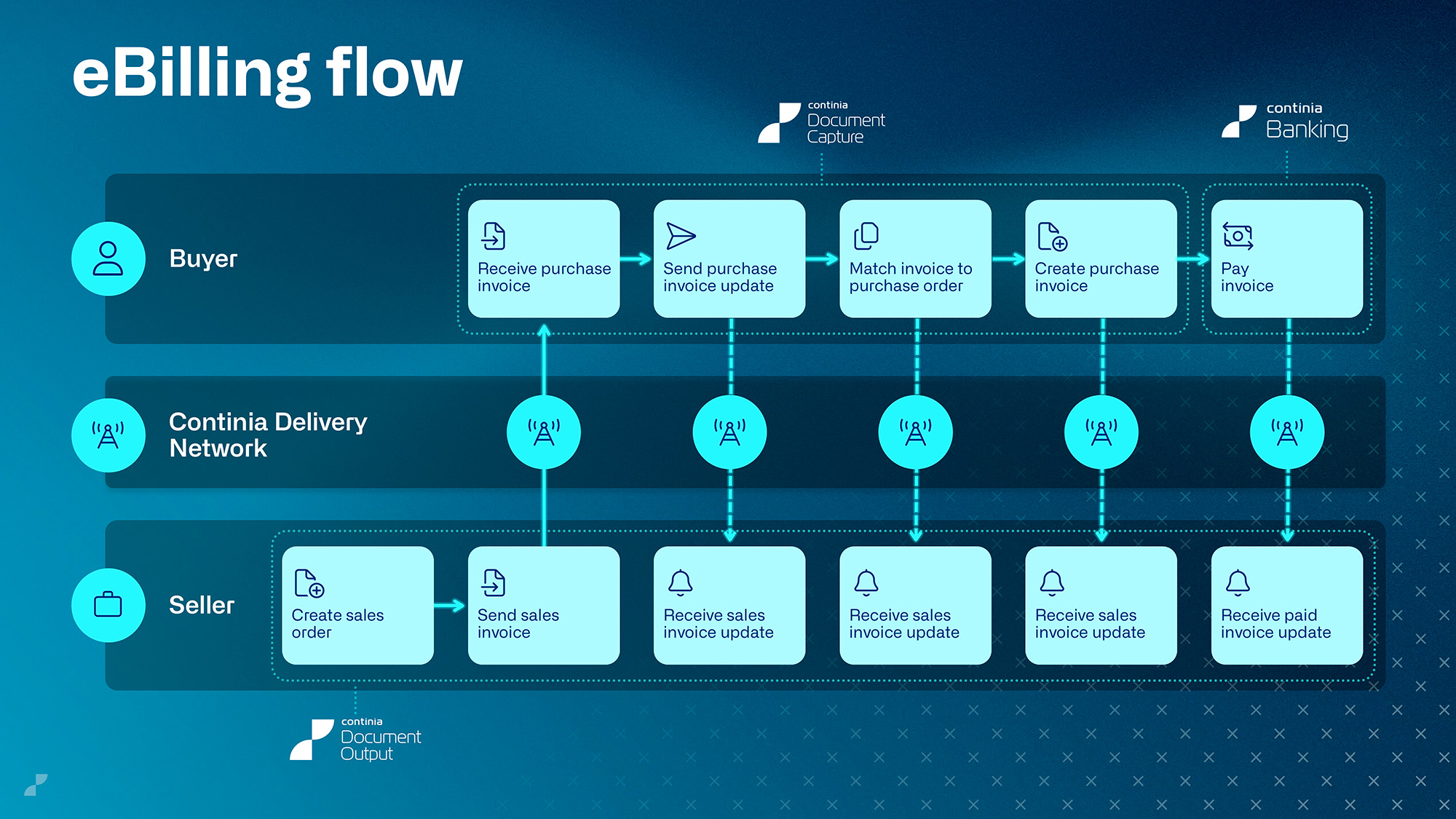
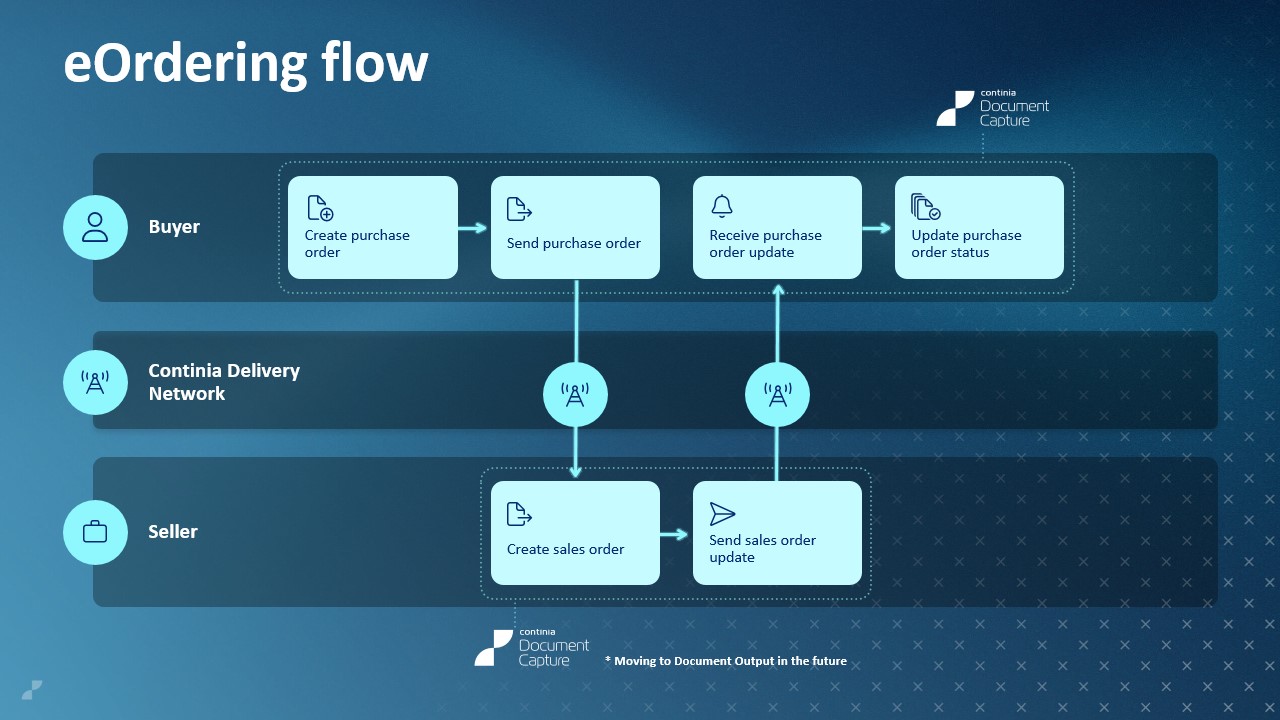
Although sharing the eDocuments framework, Document Output and Document Capture cover different aspects of it and support different document flows, as illustrated in the diagrams below. The solutions can be used independently or together for full end‑to‑end electronic document handling.
Vigtigt
As of version 28 (2026 R1), some document flows are only supported by Continia Document Capture, while the sales eBilling flow is supported exclusively by Continia Document Output, so you may need both solutions for your organizational setup. For more information, see New Document Output framework below.
For more details about Continia eDocuments, including activation, setup, functionality, and flows, check out the useful links provided in the table below:
| To | See |
|---|---|
| Find out what exactly eDocuments are and how they could benefit you | General introduction to Continia eDocuments |
| Activate Continia eDocuments for Document Output | Activating Continia eDocuments |
| Set up Continia eDocuments and learn about XML structures | Setting up Continia eDocuments for Document Output |
| Learn about sender profiles and how to create them | Creating a sender profile |
| Set up customers so that you can exchange electronic documents with them | Setting up customers for Continia eDocuments |
| Learn about Continia eDocuments table structures and the rendition of XML files as Business Central records | eDocuments table structures |
| Learn about XML structures and how to extend them | Creating XML structure extensions |
| Get a rundown of typical document flows within Continia eDocuments | Continia eDocuments flows |
| Find out how to use Continia eDocuments as a vendor | eDocuments vendor flows |
| Configure payment means on various levels (bank account, company, and customer) | Using payment means in eDocuments |
New Document Output framework
With the release of 2026 R1 (v28), the eBilling part of the eDocuments sales flow (also referred to as the vendor flow) has been moved to Continia Document Output. This means that you can no longer send sales invoices and sales credit notes from Continia Document Capture – you must have Document Output activated to do so. By activating Document Output, existing Document Capture users will gain access to a host of advanced features, including automatic sending of documents using output profiles, template-based message configuration, the ability to embed PDFs and file attachments in XML files, and a new Send eDocument action for sending posted documents manually, to mention just a few.
The introduction of the eDocuments framework to Document Output replaces XML export for v28 and later, although XML export is still supported in older versions. The new framework is significantly more modern than the XML export framework, and it's also easier to extend. It supports the same – and more – formats (including PINT, PINT A-NZ, and SI-UBL), is more flexible and future-proof, and adds support for advanced features such as the following:
- Payment means without the use of extensions
- Ability to edit XML files before they're resent
- Network‑level Schematron validation before documents are sent
The new framework has been added as a feature – Enhanced Continia eDocuments – which is enabled by default for new installations, whereas existing Document Output customers can manually activate the feature at their own leisure for at least a year. When you enable this feature, the following features are activated:
- The unified eDocuments framework, covering both Document Capture and Document Output
- The consolidated sales eBilling flow
- The sender profile functionality
In addition, note that enabling the feature will disable the old eDocument Setup feature entirely (not to be confused with the Continia eDocuments Setup feature).